
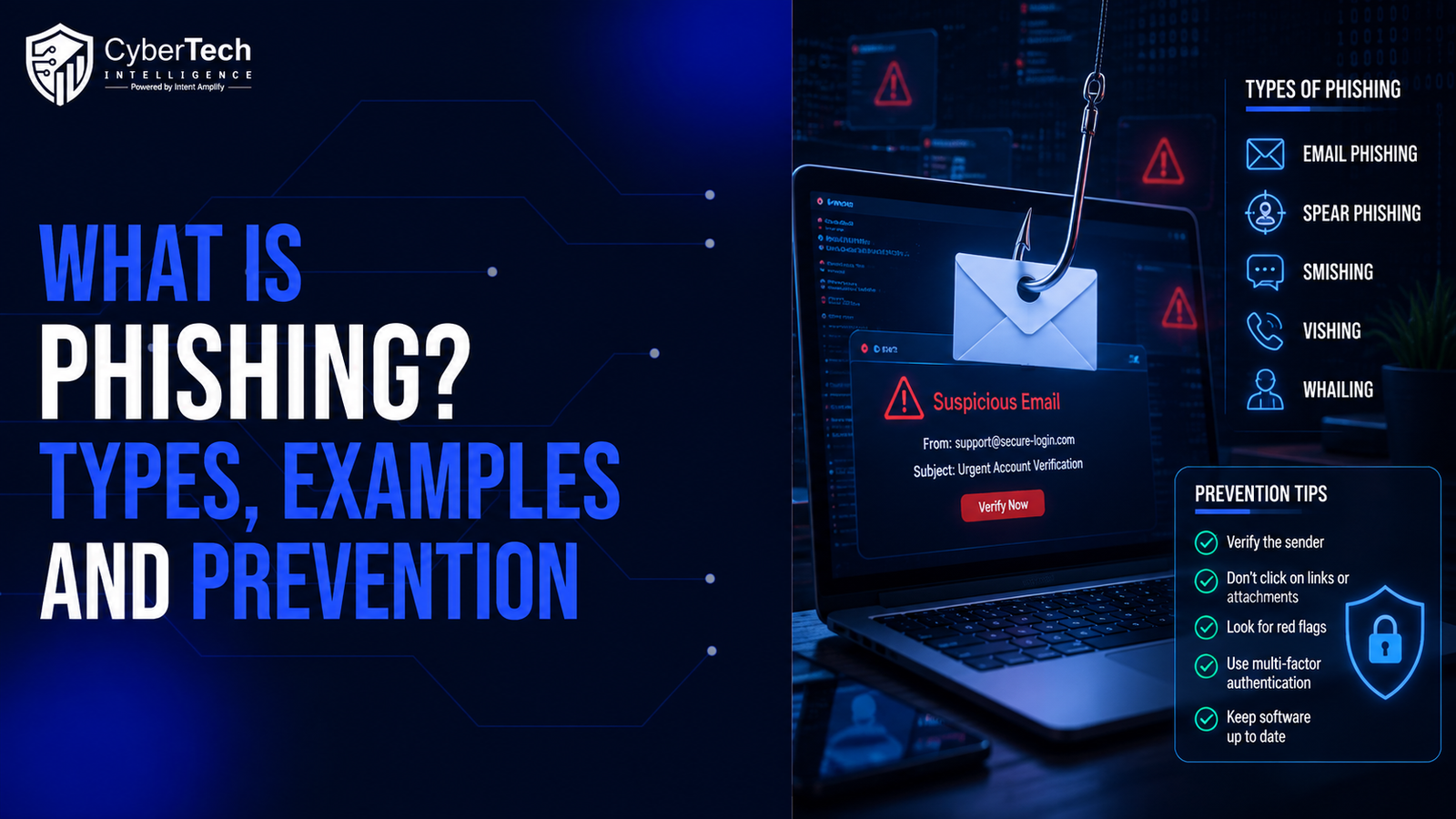
Phishing is a social-engineering attack in which a criminal impersonates a trusted person, organization, or digital service to persuade someone to disclose information, transfer money, authorize access, install malicious software, or perform another unsafe action. Although phishing is most commonly associated with fraudulent emails, attacks can also arrive through text messages, phone calls, QR codes, social media platforms, search advertisements, collaboration tools, and cloud applications.
The defining characteristic of phishing is deception rather than a specific communication channel. Attackers manufacture a believable situation and pressure the target to act before independently verifying it. A successful attack may provide access to passwords, authentication sessions, financial processes, confidential information, endpoints, or entire cloud environments.
The FBI’s 2025 Internet Crime Report recorded more than one million complaints and identified phishing and spoofing among the most frequently reported complaint categories. Verizon’s 2026 Data Breach Investigations Report also found that mobile-focused social engineering produced click rates 40% higher than comparable traditional methods, indicating that phishing is increasingly moving from corporate inboxes to mobile devices.
What Is Phishing in Simple Terms?
Phishing is an attempt to make a fraudulent message, website, call, or application appear trustworthy. The attacker wants the target to take an action that compromises security, such as entering credentials, opening a malicious file, approving an authentication request, sharing sensitive information, or changing payment details.
Key Takeaways
● Phishing is a family of deception techniques, not only a type of fraudulent email.
● Attackers can use email, SMS, phone calls, QR codes, social media, search results, advertisements, and cloud applications.
● The objective may be credential theft, session-token theft, malware installation, financial fraud, data exposure, or persistent cloud access.
● Correct spelling, professional design, and familiar branding do not prove that a message is legitimate.
● Multifactor authentication reduces risk, but manually entered one-time codes are not considered phishing-resistant.
● Organizations need layered controls across email, identity, endpoints, business processes, employee reporting, and incident response.
● Sensitive requests should be verified through a trusted channel independent of the original message.
How Does Phishing Work?
Phishing attacks vary in sophistication, but most follow a recognizable sequence. Understanding that sequence helps organizations identify where preventive and detective controls should operate. It also shows why phishing cannot be addressed only through employee awareness training.
The Five Stages of a Phishing Attack
1. Target selection and research
Attackers may distribute a generic message to thousands of recipients or research a specific employee, executive, customer, supplier, or department. Public websites, social-media profiles, job descriptions, press releases, professional networking sites, breached databases, and compromised mailboxes can provide useful targeting information.
The collected information may reveal:
● Employee names and responsibilities
● Reporting relationships
● Suppliers and business partners
● Technology platforms in use
● Current projects or events
● Executive travel or availability
● Payment and approval processes
● Common file-sharing services
● Internal terminology
A broadly distributed phishing campaign may require little research. A spear-phishing attack, however, uses contextual information to create a message that fits the target’s actual work.
2. Impersonation
The attacker chooses a person, company, or service that the target is likely to trust. The message may appear to come from a bank, cloud provider, delivery company, government agency, executive, colleague, supplier, customer, recruiter, or IT administrator.
Impersonation techniques include:
● Misleading display names
● Lookalike domains
● Forged sender addresses
● Copied logos and templates
● Spoofed telephone numbers
● Fake social-media profiles
● Compromised legitimate accounts
● Fraudulent cloud applications
A message sent from a compromised real account can be more difficult to detect than one sent from an obviously fraudulent domain. It may appear in an existing conversation, use familiar language, and pass conventional email-authentication checks.
3. Psychological manipulation
The attacker creates a reason for immediate or emotionally driven action. The message may claim that an account will be suspended, an invoice is overdue, a confidential document requires review, or a senior executive needs urgent assistance.
Common influence techniques include:
● Urgency: “Complete this within one hour.”
● Fear: “Your account has been compromised.”
● Authority: “The CEO has approved this request.”
● Curiosity: “View the confidential salary document.”
● Secrecy: “Do not discuss this transaction.”
● Scarcity: “This offer expires today.”
● Helpfulness: “Can you quickly resolve this problem?”
● Professional obligation: “The audit team requires your response.”
The purpose of these techniques is to reduce deliberation. The attacker wants the recipient to react to the situation rather than verify whether it is genuine.
4. Requested action
The target is asked to perform an action that appears normal but creates risk.
Common requests include:
● Open a link
● Enter login credentials
● Download an attachment
● Scan a QR code
● Approve an MFA notification
● Reveal a one-time password
● Grant cloud-application permissions
● Change bank account information
● Transfer funds
● Purchase gift cards
● Share customer or employee data
● Install remote-access software
The requested action may be only the first stage of the intrusion. A fake login page, for example, could capture credentials and then redirect the victim to the real service, making the interaction appear successful.
5. Exploitation and follow-on activity
After the victim complies, the attacker may use the captured access immediately or retain it for later activity. A compromised email account can be searched for invoices, credentials, customer contacts, confidential documents, and opportunities to deceive additional recipients.
Potential follow-on actions include:
● Account takeover
● Session-token theft
● Business email compromise
● Internal spear phishing
● Data exfiltration
● Payroll or invoice diversion
● Malware deployment
● Cloud-application abuse
● Privilege escalation
● Ransomware delivery
What Do Phishing Attackers Want?
The immediate request in a phishing message does not always reveal the attacker’s ultimate objective. A fake password-reset page may appear to target one account, but the attacker could use that account to compromise other employees, access connected applications, or manipulate business transactions.
|
Immediate objective |
Likely follow-on activity |
|
Capture a username and password |
Account takeover, data theft, or internal phishing |
|
Obtain an MFA code |
Complete an unauthorized login |
|
Steal a session token |
Access an account without repeating the full login process |
|
Install malware |
Espionage, credential theft, ransomware, or persistent access |
|
Change payment information |
Invoice diversion or financial fraud |
|
Collect personal information |
Identity theft or targeted social engineering |
|
Gain OAuth consent |
Persistent access to email, files, contacts, or calendars |
|
Compromise an email account |
Business email compromise and supplier fraud |
|
Persuade an employee to act |
Transfer money, disclose information, or weaken controls |
Modern phishing campaigns may combine several objectives. An adversary-in-the-middle phishing site can collect a password, proxy an MFA interaction, and capture the resulting authenticated session in one attack chain. Microsoft documented a large-scale 2026 campaign that used polished enterprise-themed messages, multiple staging pages, and AiTM infrastructure to capture authentication tokens.
What Are the Main Types of Phishing?
Phishing attacks can be classified by delivery channel, level of targeting, victim profile, and technical method. These categories often overlap. A senior executive receiving a personalized SMS message containing a malicious QR code could simultaneously be targeted through spear phishing, whaling, smishing, and quishing.
Phishing Types at a Glance
|
Phishing type |
Distinguishing feature |
Common objective |
|
Email phishing |
Broadly distributed fraudulent email |
Credentials or malware |
|
Spear phishing |
Personalized targeting |
Account or system compromise |
|
Whaling |
Targets executives or high-value personnel |
Financial approval, data, or access |
|
Business email compromise |
Abuses trusted business identities and processes |
Payment or information fraud |
|
Clone phishing |
Copies a previously legitimate message |
Malicious replacement link or file |
|
Smishing |
Delivered through SMS or messaging apps |
Credentials, payments, or malware |
|
Vishing |
Uses telephone or voice communication |
Information or authorization |
|
QR-code phishing |
Conceals a destination in a QR code |
Fake login or malicious application |
|
Social-media phishing |
Uses profiles, comments, or direct messages |
Account theft or fraud |
|
OAuth consent phishing |
Requests cloud-application permissions |
Persistent cloud access |
|
AiTM phishing |
Proxies a genuine authentication process |
Credentials and session tokens |
|
Search-engine phishing |
Uses fraudulent search results or advertisements |
Website impersonation and credential theft |
1. Email Phishing
Email phishing involves distributing fraudulent emails to a broad audience. The attacker normally impersonates a familiar brand or organization and asks recipients to resolve an account problem, confirm a transaction, view a file, or download an attachment.
Common email phishing themes include:
● Password expiration
● Mailbox storage limits
● Suspicious account activity
● Delivery failures
● Tax or refund notices
● Software updates
● Shared documents
● Invoice notifications
● Subscription renewals
A message may claim that a corporate mailbox will be deleted unless the recipient confirms the account immediately. The linked page copies the appearance of a genuine cloud login and records the submitted credentials. The victim may then be redirected to the real service, reducing the likelihood of immediate suspicion.
2. Spear Phishing
Spear phishing targets a specific person, team, or organization using contextual information. The message may mention a current project, colleague, supplier, conference, customer, or business transaction. Because the request fits the recipient’s work, it can appear more credible than a generic phishing campaign.
Attackers may personalize spear-phishing messages using:
● The recipient’s job title
● Names of colleagues or managers
● Active projects
● Supplier relationships
● Publicly announced events
● Internal terminology
● Previously stolen correspondence
For example, a project manager may receive a file-sharing notification that appears to come from a consultant involved in an active engagement. The sender name, document title, and project terminology may all be correct. The attack succeeds because the message reflects a real professional context.
3. Whaling
Whaling is a targeted attack against executives, board members, senior officials, or other individuals with valuable authority or access. These targets may be able to approve payments, access strategic information, influence other employees, or override ordinary procedures.
A whaling message may impersonate:
● A chief executive
● A board member
● An investor
● A legal adviser
● A regulator
● Another senior executive
A chief financial officer might receive an apparent message from the CEO requesting an urgent and confidential transfer related to an acquisition. The request may instruct the recipient not to involve other employees because the transaction has not been announced. Authority, urgency, and secrecy are combined to discourage verification.
4. Business Email Compromise
Business email compromise, or BEC, uses an impersonated or compromised business identity to obtain money, confidential information, or another valuable action. Unlike many phishing campaigns, BEC may not contain a malicious link or attachment. The attacker may rely entirely on a believable conversation.
Common BEC scenarios include:
● Supplier bank-account changes
● Fraudulent invoices
● Payroll diversion
● Executive payment requests
● Gift-card fraud
● Tax-data requests
● Real-estate transaction fraud
● Attorney or adviser impersonation
An attacker may compromise a supplier’s mailbox, monitor authentic invoice conversations, and wait until a payment is expected. The criminal then inserts new bank details into the real email thread. The FBI identifies spoofing and phishing as important components of business email compromise schemes.
5. Clone Phishing
Clone phishing reproduces a legitimate message that the recipient has already received. The attacker changes the original link, attachment, or payment details while preserving the subject line, branding, formatting, and surrounding context.
Typical explanations include:
● “The original attachment was incorrect.”
● “The previous link has expired.”
● “The invoice has been updated.”
● “The file was corrupted.”
● “I forgot to include the document.”
The message appears familiar because the recipient recognizes the earlier communication. Clone phishing is especially convincing when the attacker has access to a real mailbox and can copy authentic messages.
6. Smishing
Smishing is phishing delivered through SMS, mobile messaging applications, or other text-based channels. Common themes include parcel delivery, unpaid tolls, bank alerts, mobile-service suspension, tax refunds, recruitment offers, and executive requests.
Smishing can be effective because:
● Mobile screens display limited sender and URL information.
● Users often read texts while distracted.
● Shortened links can conceal the destination.
● Messages may appear inside familiar conversation threads.
● Recipients may respond more quickly to mobile notifications.
Verizon’s 2026 DBIR reported that mobile social-engineering click rates were 40% higher, suggesting that attackers are increasingly targeting users through texts, calls, and other mobile interactions.
7. Vishing
Vishing is phishing conducted through voice calls, internet telephony, voicemail, or AI-generated audio. The caller may impersonate a bank employee, IT support technician, government official, customer, supplier, or executive.
A vishing attacker may ask the target to:
● Reveal an authentication code
● Approve an MFA notification
● Install remote-support software
● Confirm account information
● Transfer money
● Visit a fraudulent website
● Disable a security control
A caller claiming to be from the IT help desk may say that suspicious activity has been detected on an employee’s account. The caller offers to fix the issue but asks the employee to approve an authentication request. The unsafe action is presented as part of a legitimate security procedure.
8. QR-Code Phishing
QR-code phishing, sometimes called quishing, uses a QR code to hide the destination of a malicious link. Codes may appear in emails, documents, posters, parking notices, delivery labels, conference materials, or printed letters.
QR-code attacks create several defensive challenges:
● The destination is not visible before scanning.
● The interaction may move to a personal device.
● Email link-analysis controls may not inspect the destination.
● Mobile login pages can be harder to evaluate.
● Users may associate QR codes with routine, legitimate processes.
Microsoft reported an increase in credential phishing, QR-code phishing, and CAPTCHA-gated campaigns during the first quarter of 2026.
9. Social Media and Angler Phishing
Social-media phishing uses fake profiles, direct messages, comments, and impersonated support accounts. Attackers may copy the branding and public content of a real company or employee. Social platforms also provide information about relationships, interests, location, travel, and current activity that can support more targeted attacks.
Angler phishing occurs when an attacker monitors public customer complaints and responds while pretending to represent the affected company. A customer posting about a banking problem may receive an immediate direct message from a fraudulent support account. The attacker then provides a fake recovery link or requests account information.
10. OAuth Consent Phishing
OAuth consent phishing attempts to persuade a user to authorize a malicious cloud application. Instead of requesting the victim’s password, the attacker asks for permissions that allow access to email, files, contacts, calendars, or other cloud data.
Potentially dangerous permissions include:
● Read email
● Send messages
● Access files
● View contacts
● Modify cloud data
● Maintain access when the user is offline
● Read calendars
● Access organizational directories
An application called “Secure Document Viewer” may claim that authorization is necessary to open a file. The application name and login screen may look legitimate, but the requested permissions are far broader than the stated purpose. Changing the user’s password may not remove the application’s authorized access.
11. Adversary-in-the-Middle Phishing
Adversary-in-the-middle phishing places attacker-controlled infrastructure between the victim and a genuine authentication service. The fraudulent site relays the real login process while capturing the victim’s credentials and authenticated session.
An AiTM attack may capture:
● Username
● Password
● One-time authentication code
● MFA approval
● Session cookie
● Authentication token
NIST states that authentication methods requiring users to manually enter authenticator outputs, including one-time passwords, are not phishing-resistant because a fraudulent service can relay the value to the legitimate verifier. NIST identifies cryptographic approaches such as properly configured WebAuthn and FIDO2 authentication as capable of providing phishing resistance through verifier binding.
12. Search Engine and Advertising Phishing
Search-engine phishing uses fraudulent organic results or paid advertisements to direct users to impostor websites. The attacker may imitate software-download pages, banking portals, cryptocurrency services, government sites, payroll systems, or customer-support pages.
Users may trust a result because it appears near the top of a search page. However, search placement does not establish legitimacy. The FBI has warned that criminals use fraudulent search advertisements to imitate employee self-service websites and steal login and financial information.
Realistic Phishing Examples
The following scenarios illustrate common phishing techniques. They are examples rather than descriptions of specific incidents.
Example 1: Password-Expiration Email
Message: “Your corporate password expires today. Sign in within two hours to avoid losing access.”
Warning signs:
● Unexpected deadline
● Authentication initiated through an email link
● Destination outside the corporate domain
● Generic account warning
● Pressure to act immediately
Likely objective:
Credential theft and cloud-account takeover.
Example 2: Supplier Bank Account Change
Message: “We have changed banking providers. Please use the attached account details for all outstanding invoices.
Warning signs:
● Financial instructions changed through email
● Request bypasses the normal supplier-verification process
● Slightly altered sender domain
● Unusual urgency before a payment deadline
● Lack of independent confirmation
Likely objective:
Invoice diversion and financial fraud.
Example 3: Executive Gift-Card Request
Message: “I am in a confidential meeting. Purchase ten gift cards and send me the codes. Do not call.”
Warning signs:
● Unusual payment method
● Request to maintain secrecy
● Pressure to avoid verification
● Claimed executive authority
● Action outside normal purchasing procedures
Likely objective: Direct financial theft.
Example 4: Shared-Document Lure
Message: “A confidential salary-review document has been shared with you.”
Warning signs:
● Curiosity-based subject
● Unexpected sensitive document
● Unfamiliar file-sharing domain
● Login requested before the file is shown
● Broad OAuth permissions requested
Likely objective:
Cloud account or application compromise.
Example 5: Fake Help-Desk Call
Scenario: A caller claims that an employee’s account is being attacked and asks the employee to approve an MFA prompt.
Warning signs:
● Unsolicited technical-support call
● Request to approve authentication
● Fear and urgency
● Caller discourages independent verification
● Request conflicts with help-desk policy
Likely objective: Unauthorized login using stolen credentials.
How Can You Recognize a Phishing Attempt?
No single sign proves that a message is malicious, and sophisticated attacks may avoid traditional spelling or formatting errors. A professionally written message can still be fraudulent. Users should evaluate the sender, context, destination, requested action, and consistency with normal business processes.
Common Phishing Warning Signs
● The display name and sender domain do not match.
● The domain contains substituted, added, or missing characters.
● The request creates unusual urgency, secrecy, or fear.
● The sender asks for credentials or authentication codes.
● An MFA prompt appears without a user-initiated login.
● Bank, payroll, or payment information changes unexpectedly.
● The request bypasses established approval procedures.
● The visible link text differs from the destination.
● A QR code replaces a normal link.
● An attachment or shared document was not expected.
● The sender asks the recipient not to verify the request.
● A cloud application requests excessive permissions.
● The message comes from an unusual channel.
● The request is inconsistent with the sender’s normal behavior.
Questions to Ask Before Acting
- Was I expecting this message or request?
- Does the sender's address match the claimed organization?
- Is the request consistent with normal business procedures?
- Is the sender creating unnecessary urgency or secrecy?
- Does the destination use the correct domain?
- Is the requested information or permission necessary?
- Can I verify the request through a known channel?
- Would the claimed sender normally ask me to do this?
What Happens After a Successful Phishing Attack?
A successful phishing attack does not necessarily end when the attacker obtains a password. The compromised identity or device may become a platform for further activity, and the victim may not immediately notice any visible problem.
Credential Theft
The attacker may use the stolen password to access email, files, business applications, and connected cloud services. Reused credentials may also be tested against other accounts.
Session-Token Theft
An AiTM site may capture an authenticated browser session. Resetting the password alone may not terminate this access, so active sessions and authentication tokens must also be revoked.
Mailbox Takeover
Attackers may search email for invoices, customer contacts, credentials, internal procedures, and sensitive documents. They may also create hidden forwarding rules or use the account to target colleagues and suppliers.
OAuth Persistence
A malicious application may retain access through an authorization token. The organization must identify the application, revoke consent, and investigate what information it accessed.
Malware Installation
A malicious attachment or website may install an information stealer, remote-access tool, ransomware loader, or other malware. The attacker can then expand beyond the original account.
Financial Fraud
The attacker may change invoice details, redirect payroll payments, request gift cards, or manipulate employees into authorizing transfers.
Lateral Phishing
A compromised account can send messages to internal and external contacts. Because the messages originate from a legitimate mailbox, recipients may be more likely to trust them.
How Can Individuals Prevent Phishing?
Individuals cannot control every technical safeguard, but they can reduce risk by changing how sensitive requests are handled.
Personal Phishing-Prevention Checklist
● Access important services through trusted bookmarks or official applications.
● Avoid signing in through unexpected links.
● Verify sensitive requests through a separate communication channel.
● Use a password manager that recognizes legitimate domains.
● Enable MFA on important accounts.
● Prefer passkeys or security keys when available.
● Never disclose one-time codes to a caller or message sender.
● Review application permissions before approving access.
● Keep devices, browsers, and applications updated.
● Report suspicious messages promptly.
● Treat unexpected MFA prompts as a possible compromise.
● Use unique passwords for every service.
NIST requires phishing-resistant authentication at its highest assurance level and requires AAL2 services to offer a phishing-resistant option. Properly configured cryptographic authenticators can bind authentication to the legitimate service, preventing a fraudulent page from reusing the authentication output.
How Can Organizations Prevent Phishing Attacks?
Effective phishing prevention requires multiple defensive layers. The UK National Cyber Security Centre recommends combining technology, business processes, user support, and incident response rather than expecting employees to detect every malicious message.
1. Reduce Malicious Message Delivery
Organizations should prevent as many phishing messages as possible from reaching users.
Priority controls include:
● Secure email gateways
● Link analysis and rewriting
● Attachment sandboxing
● QR-code inspection
● Domain and sender reputation analysis
● Malware detection
● External-sender indicators
● Blocking of dangerous file types
● Protection for chat and collaboration platforms
● Monitoring for lookalike domains
SPF, DKIM, and DMARC help protect email domains from direct spoofing. DMARC allows a domain owner to define how receiving systems should handle messages that fail authentication and alignment checks. However, these technologies do not prevent attacks sent from lookalike domains or compromised legitimate accounts.
2. Strengthen Authentication and Identity Security
Authentication controls should be designed to reduce both credential theft and the value of stolen credentials.
Organizations should:
● Deploy phishing-resistant authentication for high-risk accounts.
● Disable legacy authentication protocols.
● Apply conditional-access policies.
● Restrict sign-ins from unmanaged devices.
● Monitor unusual locations and devices.
● Limit session duration.
● Revoke sessions after suspected compromise.
● Monitor new authentication-method registration.
● Restrict OAuth consent.
● Review high-risk cloud-application permissions.
● Apply least privilege to administrative accounts.
FIDO2 and WebAuthn-based authenticators can provide phishing resistance because the authentication response is bound to the legitimate domain. By contrast, manually entered OTP values can be relayed through an impostor service.
3. Make Business Processes Resistant to Deception
Attackers frequently succeed because they imitate ordinary business processes. Prevention therefore requires redesigning those processes so one message cannot authorize a high-impact action.
Use independent verification for:
● Bank-account changes
● Payroll changes
● High-value payments
● Executive requests
● New suppliers
● Password-reset requests
● Confidential data transfers
● Remote-support requests
● Changes to customer payment instructions
The NCSC recommends verifying important email requests through a second form of communication, such as a known telephone number, trusted account, or in-person confirmation.
4. Protect Endpoints and Browsers
Organizations should assume that some malicious links and attachments will be opened. Endpoint and network controls must therefore reduce the potential impact.
Recommended controls include:
● Endpoint detection and response
● Rapid security patching
● Supported software and devices
● Application control
● Macro restrictions
● Browser protections
● DNS filtering
● Secure web gateways
● Least privilege
● Network segmentation
● Restricted administrative workstations
These controls help prevent a single interaction from becoming a broader system compromise.
5. Build a Positive Reporting Culture
Employees should be able to report suspicious messages or accidental interactions quickly and without fear of punishment. A blame-oriented culture encourages concealment and gives attackers more time to operate.
An effective reporting process should be:
● Easy to locate
● Simple to use
● Available on mobile devices
● Monitored by the security team
● Supported by prompt feedback
● Accessible even when a primary device is compromised
The NCSC advises organizations to encourage reporting even after a user has clicked and warns that punitive approaches can discourage prompt disclosure.
6. Prepare Detection and Response
Security monitoring should identify signs that phishing has progressed beyond the initial message.
Monitor for:
● Unusual sign-ins
● Impossible travel
● New devices
● New MFA registrations
● Suspicious inbox rules
● External forwarding
● OAuth consent
● Unusual email sending
● Mass file access
● Authentication-token anomalies
● Payment-detail changes
● Endpoint malware
● Lateral phishing
The response plan should distinguish between a message that was received, a link that was opened, credentials that were submitted, an authentication request that was approved, and malware that was executed. Each situation requires a different level of containment.
What Should You Do After Clicking a Phishing Link?
The appropriate response depends on what happened after the interaction. Reporting the event quickly is critical because attackers may use captured credentials or tokens within minutes.
If You Opened the Page but Entered Nothing
- Close the page.
- Do not interact with additional prompts.
- Report the message and destination.
- Follow organizational instructions for device scanning.
- Monitor the account for suspicious activity.
- Preserve the original message for investigation.
If You Entered Credentials
- Report the incident immediately.
- Change the password from a trusted device.
- Revoke all active sessions.
- Invalidate authentication tokens.
- Review registered MFA methods.
- Remove suspicious inbox rules and forwarding.
- Review recent sign-in activity.
- Change reused passwords on other services.
- Check for malicious OAuth applications.
- Notify contacts if the account sends suspicious messages.
Changing the password alone may not remove an active session or application authorization.
If You Approved an MFA Request
- Contact the security team immediately.
- Revoke active sessions.
- Reset the account password.
- Review registered authentication methods.
- Check for new devices and applications.
- Investigate recent account activity.
- Monitor for lateral phishing.
If You Opened an Attachment or Installed Software
- Disconnect the device from the network if instructed.
- Do not delete evidence.
- Contact the incident-response team.
- Isolate and investigate the endpoint.
- Determine whether malware executed.
- Identify whether credentials or data were accessed.
- Rebuild the device if required by policy.
- Hunt for related activity elsewhere in the environment.
If Money Was Transferred
- Contact the financial institution immediately.
- Request a recall or freeze.
- Notify the security and finance teams.
- Preserve emails, transaction details, and account information.
- Contact the affected supplier or customer through a trusted channel.
- Report the incident to the appropriate law enforcement or cybercrime authority.
The FBI advises victims of search-advertisement and account fraud to act quickly and provide complete transaction information because timely reporting can improve the possibility of reversing or freezing a fraudulent transfer.
Common Phishing-Prevention Mistakes
Relying Only on Awareness Training
Training can help users recognize common tactics, but it cannot ensure that every sophisticated or contextually accurate message will be detected. Phishing defenses should assume that some attacks will reach users and some users will interact with them.
Assuming Every MFA Method Stops Phishing
One-time codes and push notifications provide stronger protection than passwords alone, but they can still be relayed or socially engineered. High-risk users and applications should use phishing-resistant authentication.
Trusting a Message Because It Passed Email Authentication
A message can pass SPF, DKIM, and DMARC when it is sent from a compromised legitimate account or an attacker-controlled domain with correctly configured authentication.
Focusing Only on Email
Attackers also use SMS, voice calls, QR codes, social media, cloud files, advertisements, collaboration tools, and malicious applications.
Punishing Users Who Report Mistakes
Punishment can delay reporting and increase the time available to the attacker. Organizations should reward prompt disclosure and treat employees as a source of detection intelligence.
Resetting Only the Password
A complete response may also require session revocation, token invalidation, OAuth permission removal, MFA reset, endpoint investigation, and mailbox review.
Industry-Specific Phishing Risks
|
Industry |
Common phishing scenario |
Potential consequence |
|
Financial services |
Customer verification, payment approval, or executive fraud |
Account takeover and financial loss |
|
Healthcare |
Clinical documents, benefits messages, or supplier invoices |
Patient data exposure and service disruption |
|
Manufacturing |
Supplier payment or remote-maintenance requests |
Financial fraud and operational compromise |
|
Technology and SaaS |
Cloud-login, repository, or developer-tool lures |
Intellectual property and customer exposure |
|
Government |
Policy, diplomatic, or official-document lures |
Espionage and credential compromise |
|
Retail |
Delivery, payment, loyalty, or promotion messages |
Customer fraud and account takeover |
|
Business services |
Client documents and executive requests |
Cross-client data exposure |
|
Education |
Payroll, benefits, student accounts, and shared documents |
Identity theft and financial fraud |
How should businesses measure phishing resilience?
Useful measurements include:
● Reporting rate
● Time to report
● Time to contain a campaign
● Malicious message delivery rate
● Adoption of phishing-resistant authentication
● Session-revocation time
● Payment-verification compliance
● Repeat compromise patterns
● Number of affected identities
● Time to remove malicious applications
Simulation click rate alone does not provide a complete measure of organizational resilience.
Key Takeaways for Enterprise Leaders
● Treat phishing as an identity, process, endpoint, and incident-response problem—not only an email problem.
● Prioritize phishing-resistant authentication for privileged and high-risk users.
● Require independent verification for financial and sensitive operational changes.
● Extend detection beyond email to mobile, collaboration, cloud, social, and search channels.
● Monitor sessions, OAuth permissions, inbox rules, and authentication-method changes.
● Build a reporting culture that rewards early disclosure.
● Measure containment speed and business-process resilience, not only simulation clicks.
CyberTech Intelligence Perspective
CyberTech Intelligence treats phishing as an observable attack chain rather than a single-message problem. Defenders should correlate lure infrastructure, impersonated brands and domains, identity telemetry, session activity, endpoint evidence, and follow-on behavior to determine whether a reported message is isolated or part of a broader campaign. This evidence-led approach helps prioritize containment around verified indicators and affected identities without assuming attribution that the available evidence cannot support.
Operationally, the highest-value questions are: Which identities and channels are being targeted? Which infrastructure or techniques recur across reports? Did any user action create an authenticated session, application consent, endpoint execution, or payment-process change? Which controls can interrupt the same pattern elsewhere? Where telemetry is missing, the correct status is unknown until additional evidence is collected.
Conclusion
Phishing is a deception-based attack that manipulates people into revealing information, granting access, transferring money, or executing malicious content. Email remains an important delivery channel, but current attacks also use mobile messages, voice calls, QR codes, cloud applications, social media, search results, and real-time authentication proxies.
The strongest defense does not depend on perfect human judgment. Organizations should reduce malicious message delivery, deploy phishing-resistant authentication, control cloud applications, secure financial workflows, protect endpoints, monitor identity activity, and make reporting easy. Users should pause whenever a message requests credentials, money, sensitive information, application access, or urgent action.
The most important principle is simple: a message should not be trusted solely because it looks professional or appears to come from a familiar identity. High-impact requests must be verified through a known and independent communication channel.
Authoritative Source Links
● FBI, Internet Crime Report 2025: https://www.ic3.gov/AnnualReport/Reports/2025_IC3Report.pdf
● Verizon, 2026 Data Breach Investigations Report: https://www.verizon.com/business/resources/reports/dbir/
● NIST SP 800-63B, Authentication and Authenticator Management: https://pages.nist.gov/800-63-4/sp800-63b.html
● UK National Cyber Security Centre, Phishing Attacks — Defending Your Organisation: https://www.ncsc.gov.uk/guidance/phishing
● Microsoft Security Blog and Threat Intelligence: https://www.microsoft.com/en-us/security/blog/
Author
CyberTech Intelligence Research Desk
Author